Create
Creating your own Web Apps
A Web App for display glasses is a standard web page. Meta documents the platform thoroughly, so this page covers only the part that is genuinely different: designing for light instead of pixels.
Start here
Meta's Web Apps documentation is the authority on setup, capabilities, input, permissions, and publishing. Read it first.
- SetupHosting, Developer Mode, connecting an app to glasses
- BuildViewport, input model, capabilities, best practices
- Starter kitOfficial toolkit for AI-assisted development
The one rule that changes everything
A waveguide adds light to the scene rather than covering it. Black emits nothing, so it is perfectly transparent. Brightness in your design is brightness on the lens.
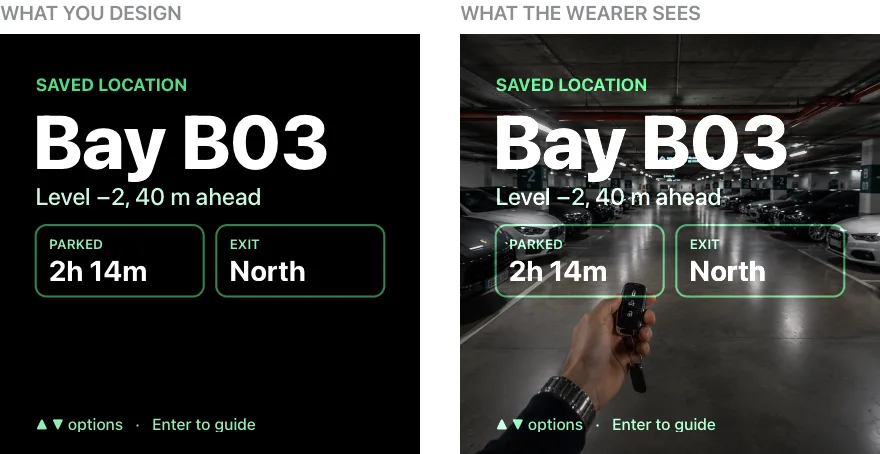
What survives daylight
Paint in light
Pure black background. Bright, saturated strokes and flat icons. High-saturation green and cyan carry furthest.
Not in ink
Dark fills, tonal gradients, and dim grays fade to nothing. Deep blue and pure red wash out first.
Heavier and larger
Medium or bold weights, generous letter spacing and line height. The projector plane and the world sit at different focal depths.
Not thin and tight
Hairline strokes and small type disintegrate against a moving background.
One idea per screen
Assume a one-second glance, off to one side, with room left at the edges where the waveguide dims.
Not a dashboard
Density that works on a phone becomes unreadable at arm's length over a real scene.
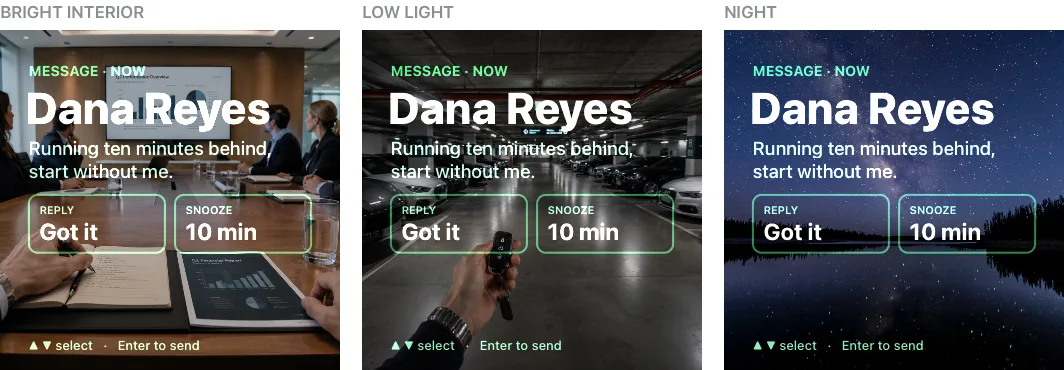
Then test it here
Load your URL in the Simulator and change the scene until something breaks. See how the Simulator works for the controls, and Web App examples for working reference implementations.
X-Frame-Options: DENY or a restrictive Content-Security-Policy: frame-ancestors. Those will not render in the Simulator. Deploy without those headers, or open the application directly on the glasses.